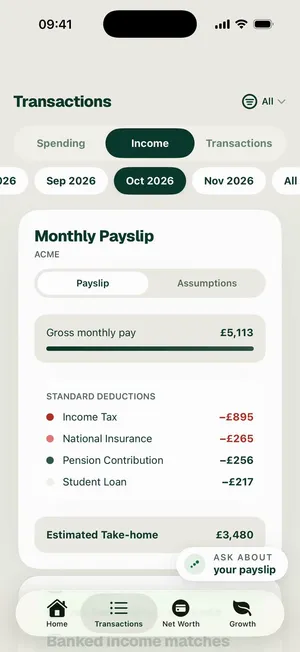
Monthly payslip · ACME
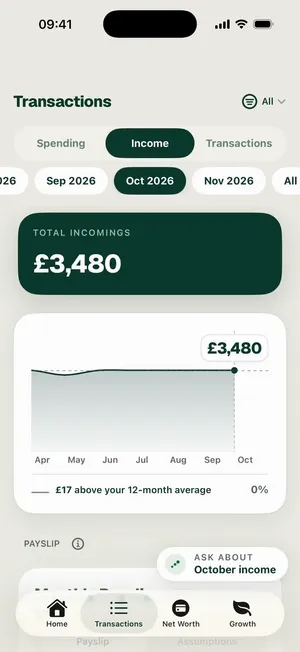
£5,113 gross becomes £3,480 take-home.
Income Tax-£895
National Insurance-£265
Pension Contribution-£256
Student Loan-£217
Worked out from your pay details and this tax year’s UK rules.
Enter your pay details once. Scroll to watch Surplus work out your take-home pay and check it against what lands in your bank.
Monthly payslip · ACME
Worked out from your pay details and this tax year’s UK rules.
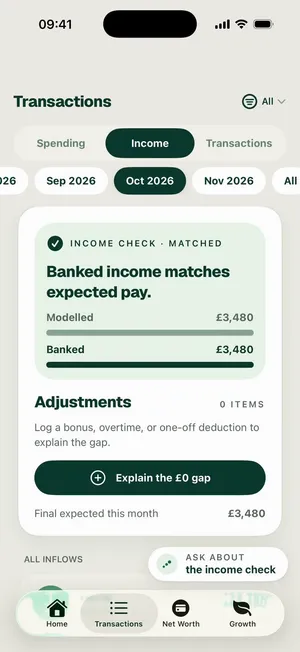
Income check · Matched
Matched against the pay in your linked account, with no spreadsheet.
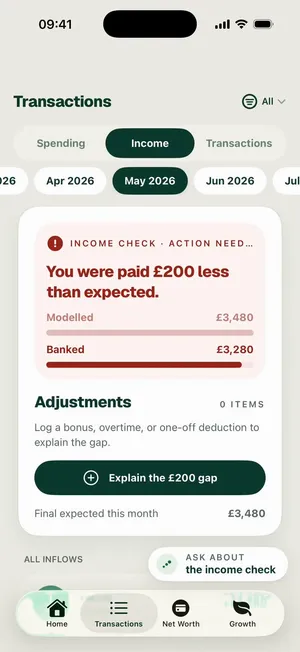
Income check · Action needed
Shown against the month it happened, so you know which payslip to ask about.
Ask AI · Surplus Pro
Uses your pay details, with the sums shown.
The payslip
It works out the deductions
Surplus works out Income Tax, National Insurance, pension and student loan from your pay details and shows the take-home pay to expect.
Monthly payslip · ACME
Worked out from your pay details and this tax year’s UK rules.
The check
It checks what lands
When your pay reaches a linked account, the income check compares it with the take-home Surplus expected. When they agree, it says so.
Income check · Matched
Matched against the pay in your linked account, with no spreadsheet.
The gap
It shows a short month
In May the pay came in under the take-home Surplus expected. The income check shows how far it fell short, so you can check your payslip, or update your pay details if something changed.
Income check · Action needed
Shown against the month it happened, so you know which payslip to ask about.
Ask AI
Ask about your pay
With Surplus Pro, ask in plain English, such as how much more you’d take home each month after a pay rise. The answer uses your own pay details and shows the sums.
Ask AI · Surplus Pro
Uses your pay details, with the sums shown.
With Surplus Pro, ask:
Surplus checks the pay that reaches your bank against the take-home pay it expects. Enter your pay details once and it works out Income Tax, National Insurance, pension and student loan and estimates your take-home pay. When your pay reaches a linked bank account, its income check compares the two and shows any gap. With Surplus Pro, you can ask AI about your pay and tax too, with the sums shown.
Surplus helps you understand your own pay and tax - it isn’t regulated tax or financial advice. AI can make mistakes. For education only, not financial advice.
Gross pay is before deductions and net pay is what you are paid. Why taxable pay can sit below gross pay, worked through on a £36,000 salary for 2026/27.
Read the guide Tax year 2026/27Why each £1 between £100,000 and £125,140 costs 60p in Income Tax, what counts as adjusted net income and how it decides Tax-Free Childcare.
Read the guide Tax year 2026/27BR, 0T, D0 and K are instructions to one employer or pension - not a verdict on your whole year. What each does and how a wrong one is fixed.
Read the guide